
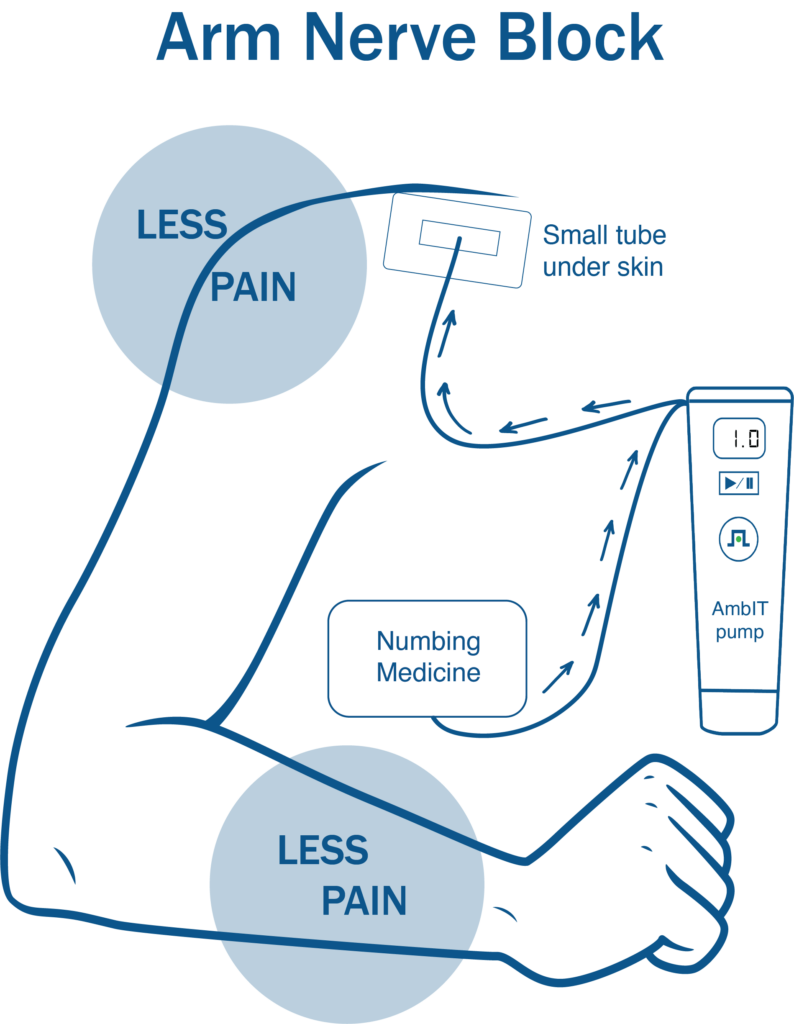
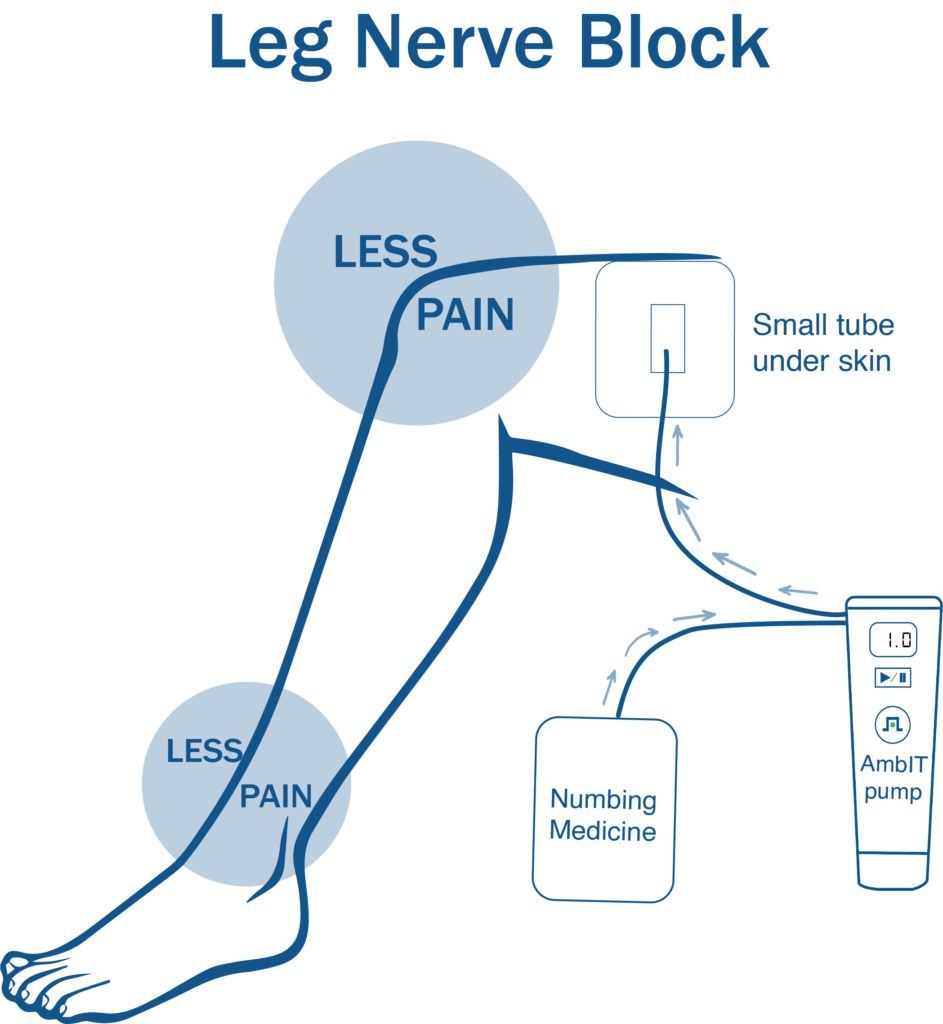
You have a small catheter (tube) located near your nerve. Local anesthetic, or numbing medicine, will be delivered at pre-programmed intervals while this catheter is in place to help numb the surgical area.
The pump is set on a rate that cannot be adjusted. You may give yourself a bolus dose of numbing medicine through the pump. Nerve blocks are designed to minimize pain after surgery, not eliminate it completely.
How do I know if the pump is working?
The pump delivers the numbing medication very slowly at pre-programmed intervals. The pump will make a whirring noise when it delivers medicine, this is normal. You will not be able to see the medicine flowing through the tube. The numbers on the display screen will start at 1.0 ml and increase to reach a goal of 500.0 ml.
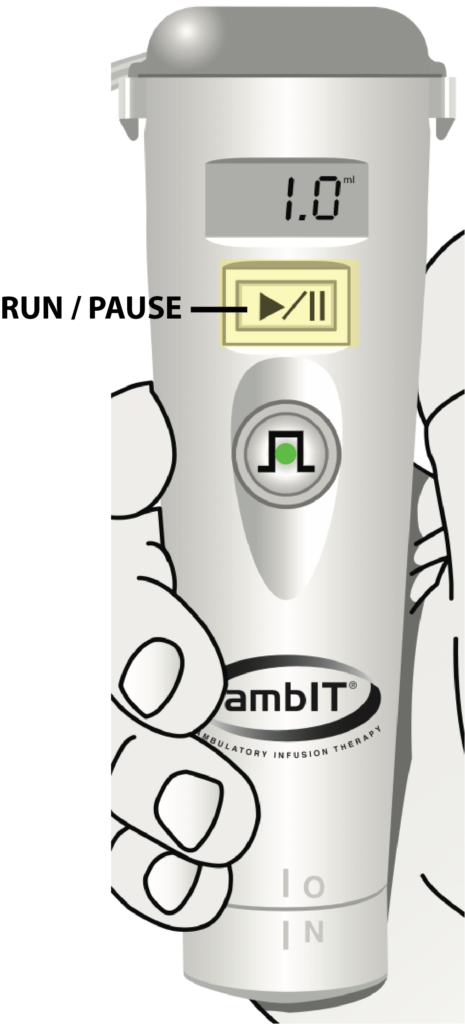
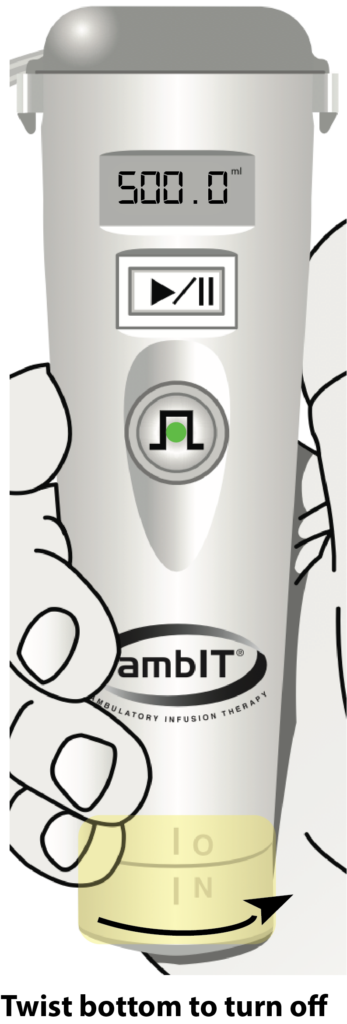
The RUN/PAUSE button is located just below the pump display and has a clear plastic guard covering it to protect from inadvertent pauses. This button is used to start, pause or resume the infusion and silence alarms.
A blinking green RUN light and “ml” (volume infused) in the pump display indicate that the pump is infusing.
You will not need to press this button in order for your pump to work properly, as it will be running prior to your discharge.
Most pumps will be set at 6.0 ml of numbing medication delivered automatically at two hours intervals.
The nerve block infusion system is complete in 4-5 days. There will be residual medicine left in the bag, this is expected.
Using the BOLUS button
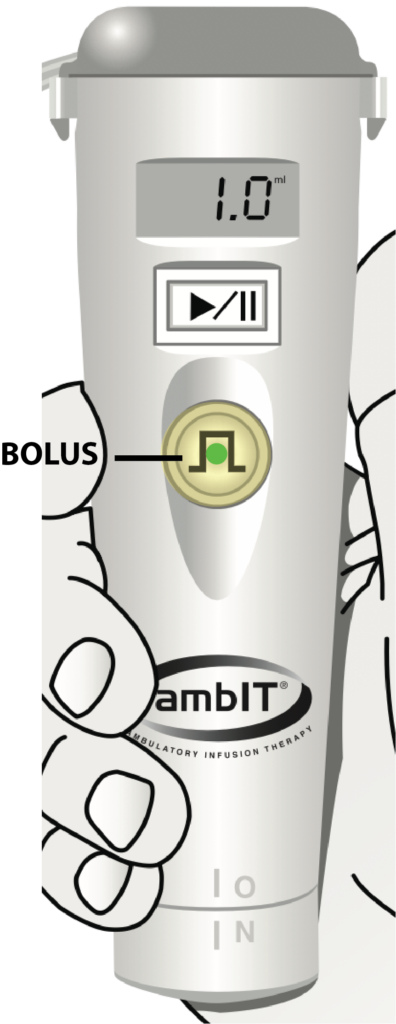
If you have pain and would like extra numbing medication, you can press the BOLUS button. Even if pressed more often, the BOLUS button is limited to delivering a 3.0 ml dose every 30 minutes for your safety.
You do not need to press the BOLUS button unless you would like more than the pre-programmed scheduled bolus.
During bolus delivery, the green run light inside the BOLUS button will double blink.
If pain has not improved after a few hours, call the anesthesiologist (find appropriate facility number listed below).
Controlling Your Pain After Surgery
Approximately 12 hours after the nerve block is placed, you may start to have increased pain. This means the initial dose administered prior to your surgery is now wearing off.
To help with the initial dense block transition, you should begin taking your oral pain medication as prescribed by surgeon before this dense block wears off. Our goal is for the pump to work in conjunction with your pain pills to maintain your pain at a tolerable level. Some amount of pain is to be expected.
Many pain medications contain Acetaminophen (Hydrocodone, Vicodin, Percocet, Lortab, Norco). Do not take any additional Acetaminophen (Tylenol) if you are taking the above medications.
When infusion is complete
Once the infusion is complete, you will hear one long tone followed by 3 short beeps, repeating every 4 minutes.
You may turn off the pump by twisting the bottom from the “ON” to “OFF” position.
There may be residual numbing medication left in the bag. This is expected.
Arm nerve block side effects
[su_expand height=”10″]
- You may not be able to move your fingers or hand until the block wears off.
- Temporary facial droop (same side as nerve block)
- Pupil size difference (same side as nerve block)
- Inability to take a deep breath
- Hoarseness
[/su_expand]
Leg nerve block side effects
[su_expand height=”10″]
- You may have a weak quad or thigh muscle.
- You may not be able to move your toes or foot until the block wears off.
- Only bear weight if directed by your surgeon.
- To prevent falls, only get up with assistance.
[/su_expand]
Caring for the nerve catheter
[su_expand height=”10″]
- Keep the catheter site dry.
- Do not get the pump wet or submerge in water.
- Ensure that pump is close by. Avoid pulling or tugging on the catheter.
- No showers or running water over site while catheter is in place.
[/su_expand]
What to do if the catheter is leaking
[su_expand height=”10″]
- Some leaking of clear or blood tinged fluid at the dressing site is normal.
- The surgical glue holding the catheter in place may have become dislodged.
- Reinforce with tape or gauze to prevent the catheter from falling out.
- Place a towel over the site to keep clothes dry.
[/su_expand]
Pump alarms
[su_expand height=”10″]
• HiPressure: check for kink in tubing and check to see if white tubing clamp is open.
• Single beep every 5 minutes: check screen, is pump stopped? To start, press and hold Start/Stop button until you see three dashes across screen.
• Low battery: Battery power is low, change batteries.
• Low: pump is almost finished. (30 – 45 minutes left)
• Empty: volume is completed. Press and hold the ON/OFF button until screen goes blank and pump
turns off.
Call the 24/7 nursing hotline 800-444-2728 for any additional pump questions.
[/su_expand]
When to call the anesthesiologist
[su_expand height=”10″]
If you develop any of the following symptoms you should turn the pump off and call the anesthesiologist immediately.
- Numb lips
- Metallic taste in mouth
- Ringing in ears
- Redness, swelling, severe pain at site
- Dizziness
- Shortness of breath
[/su_expand]
How to remove the nerve catheter
[su_expand height=”10″]
- Wash hands.
- Peel off the clear tape and dressing.
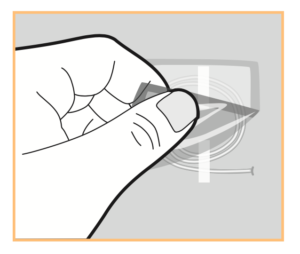
- Gently pull the catheter out from the skin. There may be some surgical glue at insertion site.
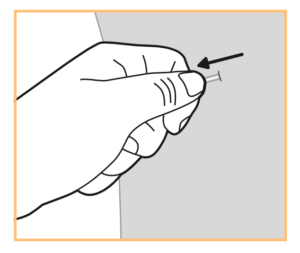
- When the catheter is completely out, there will be a blue or black tip at end of tubing.

- You may see a small amount of clear fluid once removed. No band aid or gauze is necessary.
- Disconnect or cut tubing and discard into trash. Place the system pump in provided pre-addressed box and drop off at local post office.
[/su_expand]
Troubleshooting
Malfunction alarm
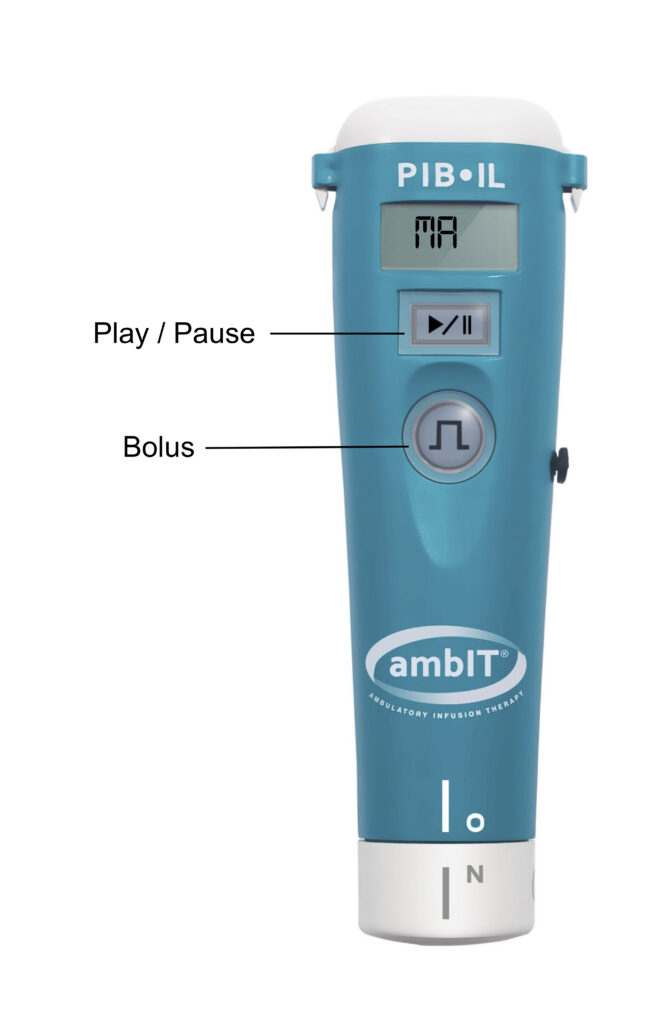
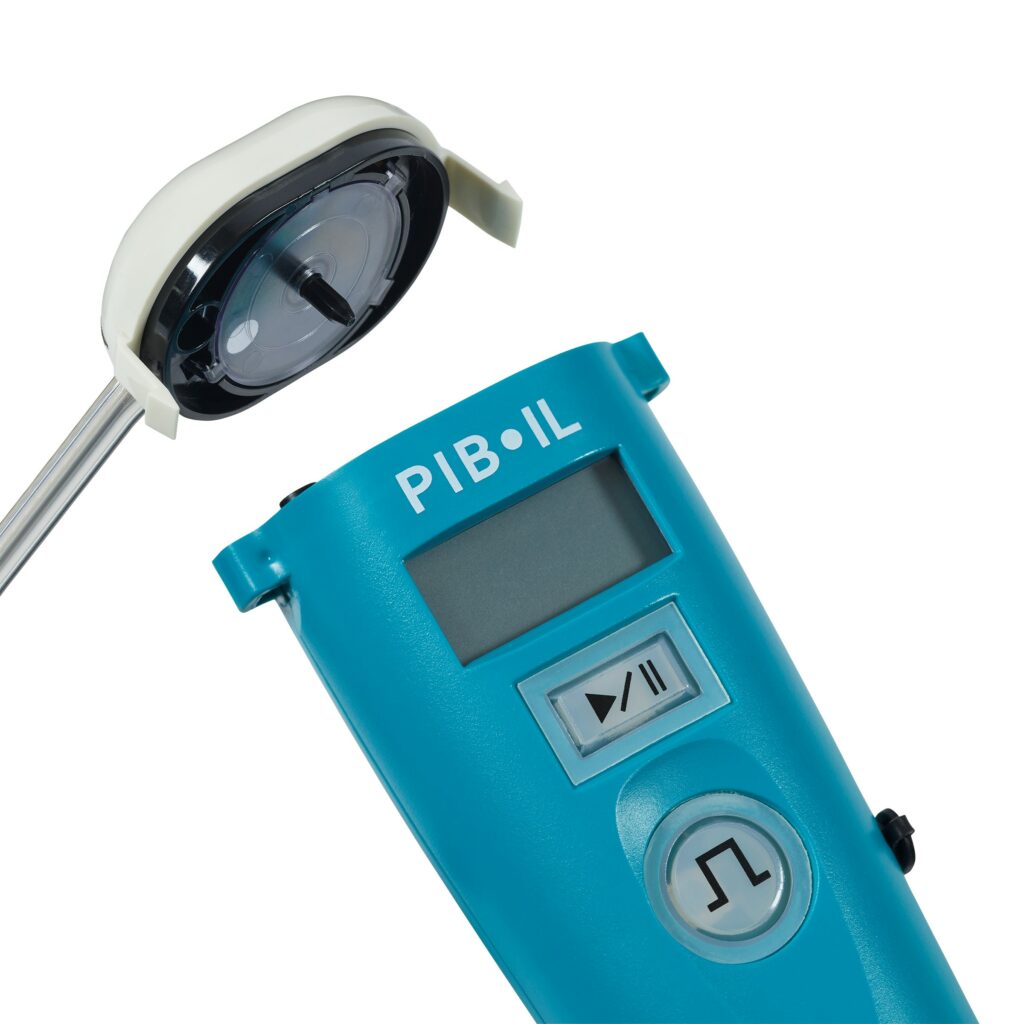
- If the “MA” or malfunction alarm sounds, hit the Play/Pause button to pause the infusion.
- Remove the cassette cap and twist the black needle on the clear disk on the underside of the cassette.
- Use your fingers to spin the cassette counterclockwise ensuring the silver circle makes one full revolution.
- Replace the cassette. It will fit correctly if not too snug or forced down.
- Hit the Play/Pause button to resume. If this alarm does not clear, contact the anesthesia team.
Occlusion alarm
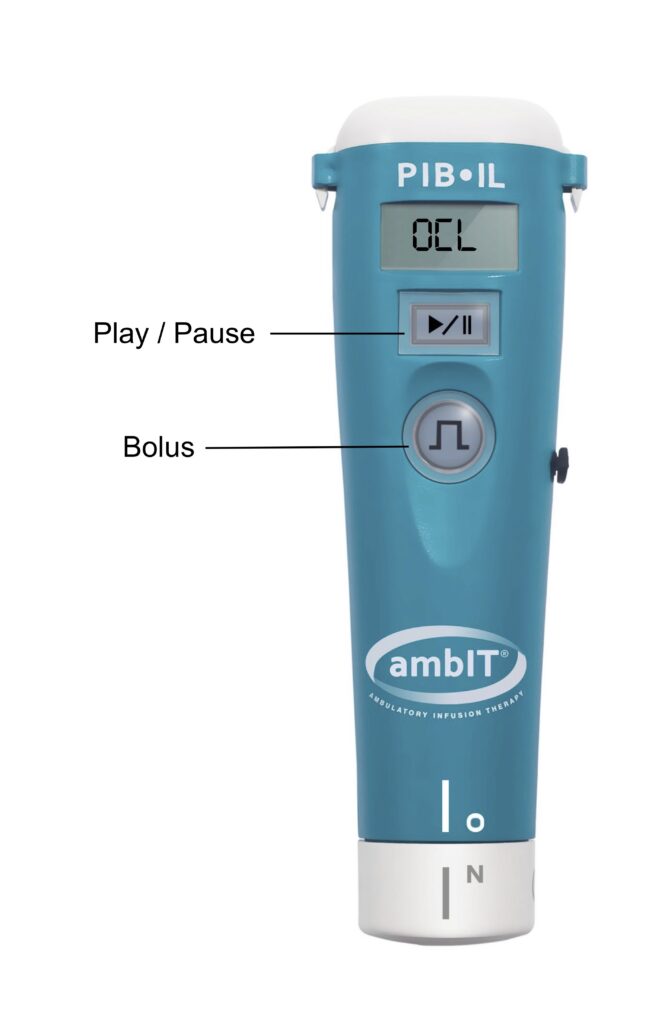
- If the occlusion alarm or “OCL” alarm sounds, check the line for any occlusions or kinks.
- Press the Play/Pause button to silence the pump and put it in Pause mode.
- If an occlusion or kink is found, press the Play/Pause button, then hit the Bolus button to resume infusion.
- If after running through this occlusion troubleshooting process this alarm has not cleared, there is a high likelihood of an occlusion. Contact the anesthesia team.
Viewing and clearing the history
To view patient history
- Press the Play/Pause button to pause the pump.
- Press and hold the Bolus button.
- Patient history will be displayed.
To clear the history
- Press and hold the Bolus button until you hear a beep and see “Hx” on the screen.
- Release after the beep.
- Then immediately press and hold the Bolus button again.
- A “0” (zero) should appear next to “Hx”.
Questions? Call the anesthesiologist
[su_accordion class=””]
[su_spoiler title=”Texas Orthopedics Surgery Center” open=”no” style=”simple” icon=”plus” anchor=”” anchor_in_url=”no” class=””]512-748-3627
512-848-0366[/su_spoiler]
[su_spoiler title=”Hyde Park Surgery Center” open=”no” style=”simple” icon=”plus” anchor=”” anchor_in_url=”no” class=””]512-748-0188[/su_spoiler]
[su_spoiler title=”Medical Park Tower Surgery Center” open=”no” style=”simple” icon=”plus” anchor=”” anchor_in_url=”no” class=””]512-748-0188[/su_spoiler]
[su_spoiler title=”Northwest Hills Hospital” open=”no” style=”simple” icon=”plus” anchor=”” anchor_in_url=”no” class=””]512-848-0366[/su_spoiler]
[su_spoiler title=”Williamson Surgery Center” open=”no” style=”simple” icon=”plus” anchor=”” anchor_in_url=”no” class=””]512-486-9306[/su_spoiler]
[su_spoiler title=”AmbIT 24/7 hour Patient Hotline” open=”no” style=”simple” icon=”plus” anchor=”” anchor_in_url=”no” class=””]800-444-2728[/su_spoiler]
Anesthesia billing questions? click here